Midjourney V7 Parameters: Stylize, Weird, Raw and More
Master Midjourney V7's parameters like Stylize, Weird, Omni-Reference, and Raw to achieve precise control over your AI image generations.
Midjourney V7, released April 3, 2025 [S1], introduced a robust set of parameters designed to give creators fine-grained control over their image generations. This guide delves into every key V7 parameter, offering practical examples, decision tables, and recommended combinations to help you unlock the full range of V7's capabilities.
Whether you aim for photorealistic accuracy, surreal artistic interpretations, or consistent character designs, understanding these settings is crucial for mastering Midjourney V7.
Midjourney V7 Parameter Cheat Sheet
This table provides a quick reference for Midjourney V7's core parameters, their effects, and important compatibility notes. For detailed explanations, refer to the sections below.
| Parameter | Range/Options | Effect on Output | Key Incompatibilities/Notes |
|---|---|---|---|
--ar (Aspect Ratio) |
1:1, 16:9, 9:16, 3:2, 21:9, etc. |
Defines the image's width-to-height ratio. | None |
--s (Stylize) |
0–1000 (Default: 100) |
Controls how strongly Midjourney applies its aesthetic preferences. Low values are literal, high values are artistic. | None |
--w (Weird) |
0–3000 (Default: 0) |
Introduces unexpected, surreal, or unusual elements. | None |
--v (Variety) |
0–100 |
Controls how different each image in a 4-image batch is from the others. | None |
--oref (Omni Reference) |
Image URL | References a source image for style, character, or composition consistency. | V7 only. Incompatible with Fast, Draft, Conversational Mode, q4, Vary Region, Pan, Zoom Out [S3]. Costs twice regular V7 GPU time [S3]. |
--ow (Omni Weight) |
1–1000 (Default: 100) |
Controls the influence of --oref. Provider recommends staying below 400 for ordinary stylize conditions [S3]. |
Only used with --oref. |
--raw |
No value | Produces images with less automatic aesthetic enhancement, closer to the prompt's literal interpretation. | None |
--iw (Image Weight) |
0–2 |
Controls the influence of an image prompt (not --oref). |
Only used with image prompts. |
--sw (Style Weight) |
0–1000 |
Controls the influence of a style reference (--sref). |
Only used with --sref. |
--sref (Style Reference) |
Image URL | References a source image for stylistic inspiration. | None |
--seed |
Integer | Sets a specific seed for reproducibility. | None |
--no |
Keywords | Excludes specified elements from the image. | None |
--q (Quality) |
0.25, 0.5, 1 (Default: 1) |
Controls rendering quality and GPU time. q4 is incompatible with --oref [S3]. |
q4 incompatible with --oref [S3]. |
--draft |
No value | Generates lower-resolution, faster images for rapid iteration. | Incompatible with --oref [S3]. |
--tile |
No value | Creates seamless, repeatable patterns. | None |
--chaos |
0–100 |
Controls the randomness and variety of initial image grids. | None |
--version |
v7, v8.1, v8.2, niji 7, etc. |
Specifies the Midjourney model version to use. | Omni Reference is V7 only [S1]. V8.1/V8.2 support HD but not Omni Reference [S1]. |
--hd / --sd |
No value | HD for high-definition, SD for standard-definition. |
V8.1/V8.2 support HD, but editing an HD image through Pan, Zoom Out, Edit, or Vary Region returns an SD result [S1]. Omni Reference is V7 only, which does not explicitly support HD/SD in the same way as V8.1/V8.2. |
--niji |
7 |
Activates the Niji model, optimized for anime and illustrative styles. | Niji 7 is compatible with V7 [S1]. |
--repeat |
Integer | Generates multiple jobs from a single prompt. | None |
--fast, --relax, --turbo |
No value | Speed modes for generation. | --fast incompatible with --oref [S3]. |
Composition and Aspect-Ratio Parameters
These parameters primarily influence the structural and spatial characteristics of your generated images.
Aspect Ratio (--ar)
The --ar parameter defines the width-to-height ratio of your image. Choosing the right aspect ratio is fundamental for framing your subject and fitting your output medium.
| Parameter | Ratio | Best For |
|---|---|---|
--ar 1:1 |
Square | Social media (Instagram), avatars |
--ar 16:9 |
Wide | Hero images, YouTube thumbnails, presentations |
--ar 9:16 |
Tall | Stories, mobile content, Pinterest |
--ar 3:2 |
Classic photo | Photography prints, editorial |
--ar 21:9 |
Ultra-wide | Cinematic, panoramic compositions |
Example:
a serene landscape with a winding river --ar 16:9
Chaos (--chaos)
The --chaos parameter influences how varied the initial image grid results are. A higher value leads to more diverse and unexpected compositions within the grid.
- Range:
0–100(Default:0) - Effect: Higher values introduce more randomness, potentially leading to wildly different interpretations of your prompt in a single grid.
- Use Case: Ideal for brainstorming and exploring a wide range of visual ideas from a single prompt.
Example:
an ancient forest, misty and mysterious --chaos 75
Tile (--tile)
Use --tile to generate images that can be seamlessly repeated to create patterns or textures. This is invaluable for graphic design, backgrounds, and textile patterns.
Example:
intricate floral pattern, art nouveau style --tile
Stylize, Weirdness, Variety and Raw
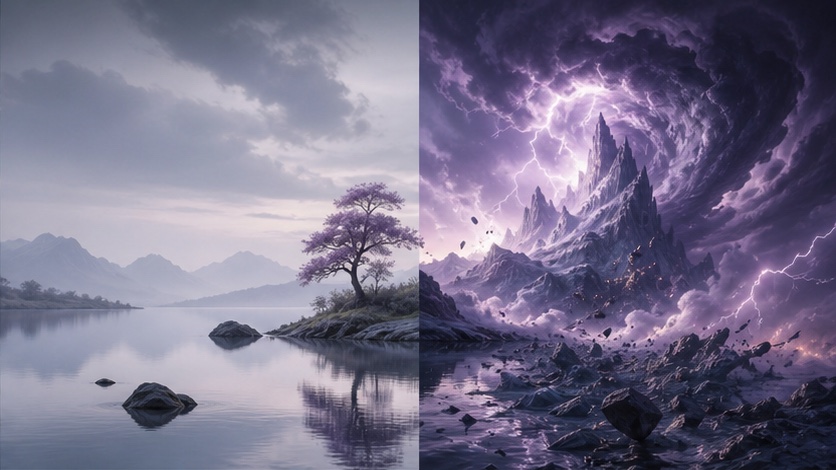
These parameters allow you to fine-tune the aesthetic and creative interpretation of your prompts, from subtle artistic polish to extreme surrealism.
Stylize (--s)
The --stylize parameter is a core setting in Midjourney V7, controlling how aggressively the model applies its built-in aesthetic preferences. The default value for V7 is --s 100 [S2].
- Range:
0–1000
Stylize Value Guide
| Range | Effect | Best For |
|---|---|---|
0–50 |
Raw, literal interpretation; minimal artistic enhancement. | Product photography, documentation, technical diagrams, reference images |
50–150 |
Subtle enhancement; balanced between prompt adherence and aesthetic polish. | Professional photography, realistic portraits, clean visuals |
150–400 |
Moderate artistic boost; noticeable Midjourney aesthetic. | Marketing visuals, editorial content, general creative work |
400–700 |
Strong Midjourney aesthetic; enhanced colors, dramatic compositions. | Brand campaigns, artistic work, hero images |
700–1000 |
Maximum drama and style; highly artistic interpretation. | Concept art, abstract work, maximum creative impact, unique visual statements |
Example Usage:
Low stylize (raw photorealism):
professional headshot of a businesswoman in a gray suit, neutral office background --s 50
High stylize (dramatic editorial):
professional headshot of a businesswoman in a gray suit, neutral office background --s 750
Weirdness (--w)
--weirdness introduces unexpected, surreal, or unusual elements into your images. It's Midjourney's tool for breaking out of conventional compositions and exploring the bizarre.
- Range:
0–3000(Default:0)
Weirdness Value Guide
| Range | Effect |
|---|---|
0 |
Off (default); conventional compositions. |
100–500 |
Subtle oddities; unusual angles, slight surreal touches, unexpected juxtapositions. |
500–1500 |
Noticeably strange; unexpected objects, impossible perspectives, dreamlike qualities. |
1500–3000 |
Maximum weirdness; abstract, barely recognizable elements, highly experimental. |
When to Use Weirdness:
- Album covers and music artwork
- Surrealist art projects
- Dream sequences and conceptual work
- Breaking creative blocks (generate at high weirdness, then refine)
Example:
a peaceful garden scene --w 1200
At --w 1200, the garden might feature flowers made of glass, trees growing upside down, or a sky with multiple moons, creating a distinctly surreal atmosphere.
Variety (--v)
--variety controls how different each image in a 4-image batch is from the others. This parameter is excellent for exploring multiple interpretations of a single prompt quickly.
- Range:
0–100
Variety Value Guide
| Range | Effect | Best For |
|---|---|---|
0–25 |
Very similar images; minor variations. | Fine-tuning a specific look, generating slight alternatives |
25–50 |
Moderate variation; distinct but related interpretations. | General creative work, exploring options |
50–75 |
High variation; significantly different compositions and styles. | Exploring different interpretations, concept development |
75–100 |
Maximum diversity; wildly different images. | Brainstorming, finding unexpected directions, breaking creative molds |
Combining with Stylize:
- High variety + low stylize: Diverse but raw interpretations.
- Low variety + high stylize: Consistent dramatic look across similar images.
- High variety + high stylize: Wildly different artistic takes, each with strong aesthetic polish.
Raw Mode (--raw)
The --raw parameter instructs Midjourney to produce images with less automatic aesthetic enhancement, adhering more closely to the literal interpretation of your prompt. This can be useful for achieving a more photographic or less "AI-generated" look.
Example:
portrait of an elderly fisherman, weathered face, dramatic lighting --raw --s 100
SREF, Image Prompts, Omni Reference and Weights
These advanced parameters allow you to guide Midjourney's generation using existing images, providing powerful tools for consistency and style transfer.
Omni Reference (--oref, --ow)
Omni Reference is a powerful V7-specific feature for maintaining consistency across multiple images [S1]. It allows you to reference a source image for character, object, or vehicle consistency, or to carry over a general style [S3].
How Omni-Reference Works:
prompt text here --oref [image URL] --ow [weight 1-1000]
--oref: Points to a reference image URL.--ow: Controls how strongly the reference influences the output. The default is100, and the provider recommends staying below400in ordinary stylize conditions [S3].
Important Notes on Omni Reference:
- Omni Reference automatically uses V7 [S3].
- It costs twice the regular V7 GPU time [S3].
- It is incompatible with Fast, Draft, Conversational Mode, q4, Vary Region, Pan, and Zoom Out [S3].
Omni-Reference Weight Guide (--ow)
| Weight | Effect | Use Case |
|---|---|---|
50–150 |
Subtle stylistic influence; general mood or color palette. | Matching a general aesthetic, light brand consistency |
150–400 |
Strong style transfer; consistent visual language. | Consistent visual language across images, strong aesthetic matching |
400–600 |
Character/object consistency; maintaining identity across scenes. | Same character in different scenes, consistent product shots |
600–900 |
Near-exact replication; strong compositional and detail adherence. | Variations of a specific composition, minor alterations to a source image |
Practical Examples:
Brand-consistent marketing:
product launch announcement visual, sleek and modern --oref [brand_reference_image_URL] --ow 300 --s 400
Character consistency:
explorer character in a jungle setting, full body --oref [character_reference_image_URL] --ow 550 --s 200
Image Prompts and Image Weight (--iw)
Beyond Omni Reference, Midjourney V7 also supports traditional image prompts, where you include an image URL at the beginning of your text prompt. The --iw (image weight) parameter controls how much influence this image prompt has on the generated output.
- Range:
0–2(Default:1) - Effect: Higher values make the output more closely resemble the image prompt's composition and content.
Example:
[image_URL] a futuristic city at sunset --iw 1.5
Style Reference (--sref, --sw)
--sref allows you to reference an image purely for its stylistic qualities, without necessarily copying its content or composition. --sw (style weight) controls the intensity of this stylistic influence.
--sref: Image URL--swRange:0–1000(Default:100)
Example:
a serene landscape, painted in the style of Van Gogh --sref [van_gogh_painting_URL] --sw 250
Parameter Recipes by Use Case
Here are some practical parameter combinations tailored for specific creative goals.
Recipe 1: Photorealistic Product Shot
[product description] on a clean white background, professional studio lighting, shot from slightly above --s 75 --ar 3:2 --fast
Recipe 2: Cinematic Brand Campaign
[scene description], dramatic lighting, film still aesthetic, cinematic color grading --s 700 --ar 21:9 --fast
Recipe 3: Consistent Character Series
[character doing something] in [setting] --oref [character_reference_URL] --ow 550 --s 200 --ar 3:2
Recipe 4: Maximum Creative Exploration
[concept description] --s 600 --w 800 --v 75 --ar 1:1
Recipe 5: Clean Editorial Portrait
portrait of [subject description], neutral background, soft natural light from camera left --s 150 --ar 4:5 --fast
Recipe 6: Rapid Concept Testing
[concept description] --draft --v 75 --ar 16:9 --fast
Common Parameter Conflicts and Unsupported Combinations
While Midjourney V7 offers extensive flexibility, certain parameter combinations are either incompatible or can lead to unexpected, undesirable results. Understanding these limitations is key to efficient generation.
Omni Reference Incompatibilities
As noted in the cheat sheet, --oref is a powerful V7-specific feature but has several known incompatibilities [S3]:
- Speed Modes: Incompatible with
--fastand--turbo(only--relaxis compatible). - Draft Mode: Cannot be used with
--draft. - Quality: Incompatible with
--q 0.25(also known asq4). - Editing Features: Cannot be used with Vary Region, Pan, or Zoom Out.
- Conversational Mode: Not supported.
Overlapping Influence Parameters
Using multiple "intensity" parameters at very high values simultaneously can lead to unpredictable or overly chaotic results. For example:
- High Stylize + High Weirdness: While possible,
--s 900 --w 1500might produce an image that is both highly artistic and extremely surreal, potentially obscuring your original prompt intent. It's often better to focus on one primary aesthetic modifier at a time. - High Omni Weight + High Image Weight: If you're using both
--orefand a traditional image prompt, setting both--owand--iwvery high can create a tug-of-war between the two references, leading to a muddled output.
Recommendation: When experimenting with high values for --s, --w, --ow, or --iw, try to adjust one at a time to understand its individual impact before combining them.
Version-Specific Features
Remember that Omni Reference is a V7-specific feature [S1]. While you can specify --v 7 to use it, newer versions like V8.1 and V8.2 do not support Omni Reference, though they do support HD generation [S1]. Always check the version compatibility for advanced features.
FAQ
What is the default stylize value in Midjourney V7?
The default stylize value in Midjourney V7 is --s 100 [S2]. This provides a moderate level of artistic enhancement. Many users find values between 150 and 400 to be a good balance for polished, yet controlled, results.
Can I use Omni-Reference with any image URL?
Yes, you can use any valid image URL with --oref. However, for best results, use high-quality, clear images with well-defined subjects. Blurry, dark, or cluttered reference images may yield less predictable outcomes.
Does Draft Mode affect the final image quality?
Draft Mode (--draft) generates lower-resolution images more quickly, making it ideal for rapid iteration and concept testing. While the draft images themselves are lower quality, the composition and concept can be carried over. Once you find a draft you like, remove --draft and re-run the prompt to generate a full-quality version.
How do parameters interact with each other?
Parameters generally combine to influence the final image. However, some combinations can lead to unexpected or conflicting results, especially when multiple parameters are set to high intensity (e.g., very high stylize and very high weirdness). A good practice is to adjust one parameter at a time to understand its individual effect before combining them, and to consult the compatibility notes for specific features like Omni Reference.
Conclusion
Midjourney V7's parameter system offers unparalleled control over your AI image generations. By mastering parameters like --stylize, --weirdness, --raw, and the powerful V7-exclusive --oref, you can precisely balance literal interpretation with creative expression. Start by understanding the default behaviors, then experiment with different values and combinations to discover your unique artistic voice.
Practice these parameters and explore Midjourney V7's capabilities on PixMind, where it's available alongside many other advanced AI models.