
Midjourney V8.2 Style References: A Repeatable Test
Learn to test Midjourney V8.2 style references for consistent campaign visuals across diverse subjects and seeds.
Midjourney V8.2, the current default version as of July 24, 2026 [S1], offers enhanced control over visual style through its --sref parameter. To evaluate its consistency for repeatable campaign visuals, you can test one style reference image across multiple subjects and seeds, observing how well the style is retained without inventing a numerical benchmark. This approach helps determine if V8.2 can reliably apply a specific aesthetic across diverse content.
What changed about style control in V8.2?
Midjourney V8.2, which became the default on July 24, 2026, builds upon previous versions by refining how style is applied and controlled [S1]. While V7 introduced features like Omni Reference and Niji 7, and V8.1 supported HD images, V8.2 continues to evolve the --sref (style reference) parameter [S1, S2].
Style Reference (--sref) is designed to carry overall visual properties from an input image, such as color palette, texture, and composition, rather than specific objects or people [S5]. This differs from Omni Reference (--oref), which is specifically for carrying a person, object, vehicle, or non-human creature, and automatically uses V7 [S3]. Moodboards, another style control option, are personalized profiles built from selected images and can use --p codes, but are incompatible with --sref and --sw [S4].
For V8.2, --sref supports versions 6 and later, and its strength can be adjusted with --sw (style weight), which ranges from 0 to 1000 and defaults to 100 [S5]. Multiple --sref images or codes can be combined, offering granular control over the desired aesthetic [S5]. This allows for a more sophisticated and potentially consistent application of a chosen style across various generations, which is crucial for maintaining brand identity in visual campaigns.
Test setup: SREF, subjects, seeds and comparison model
To conduct a repeatable test of Midjourney V8.2's style reference capabilities, you need a structured approach. This involves selecting a single style reference, defining diverse subjects, using multiple seeds, and establishing a baseline for comparison.
1. Select a Style Reference Image
Choose one image that embodies the aesthetic you want to test. This image should have a distinct and recognizable style in terms of color, lighting, texture, and overall mood. For example, a photograph with a specific film grain, color grading, or artistic rendering.
2. Define Diverse Subjects
To assess style retention across different content, select subjects that represent a range of visual complexity and categories. This helps determine if the style translates effectively from a simple object to a complex scene.
- Portrait: A human face or figure.
- Product: An inanimate object, like a piece of furniture or a gadget.
- Scene: A landscape or interior setting.
3. Use Multiple Seeds
Varying the seed (--seed) for each prompt ensures that the generated images are not merely variations of a single initial noise pattern. This helps confirm that the style is being applied robustly rather than coincidentally. Use at least three distinct seeds for each subject.
4. Establish a Comparison Model
While V8.2 is the current default, you can compare its --sref performance against a baseline. The most straightforward baseline is generating images without any --sref parameter, using only the text prompt. This highlights the specific impact of the style reference.
Test Protocol
For each subject (Portrait, Product, Scene), you will generate images using the following prompt structure:
/imagine prompt: [Subject Description], [Desired Style Keywords] --sref [URL to Style Reference Image] --sw 100 --seed [Seed Number] --ar 16:9
And for comparison:
/imagine prompt: [Subject Description], [Desired Style Keywords] --seed [Seed Number] --ar 16:9
Example Style Reference Image:
Let's assume your style reference image URL is https://example.com/my-unique-style.jpg.
Subject 1: Portrait
- Prompt 1 (SREF):
/imagine prompt: a contemplative woman, soft studio lighting, muted color palette --sref https://example.com/my-unique-style.jpg --sw 100 --seed 123 --ar 16:9 - Prompt 2 (SREF):
/imagine prompt: a contemplative woman, soft studio lighting, muted color palette --sref https://example.com/my-unique-style.jpg --sw 100 --seed 456 --ar 16:9 - Prompt 3 (SREF):
/imagine prompt: a contemplative woman, soft studio lighting, muted color palette --sref https://example.com/my-unique-style.jpg --sw 100 --seed 789 --ar 16:9 - Comparison Prompt 1 (No SREF):
/imagine prompt: a contemplative woman, soft studio lighting, muted color palette --seed 123 --ar 16:9
Subject 2: Product
- Prompt 1 (SREF):
/imagine prompt: a sleek minimalist coffee maker, clean lines, warm ambient light --sref https://example.com/my-unique-style.jpg --sw 100 --seed 123 --ar 16:9 - Prompt 2 (SREF):
/imagine prompt: a sleek minimalist coffee maker, clean lines, warm ambient light --sref https://example.com/my-unique-style.jpg --sw 100 --seed 456 --ar 16:9 - Prompt 3 (SREF):
/imagine prompt: a sleek minimalist coffee maker, clean lines, warm ambient light --sref https://example.com/my-unique-style.jpg --sw 100 --seed 789 --ar 16:9 - Comparison Prompt 1 (No SREF):
/imagine prompt: a sleek minimalist coffee maker, clean lines, warm ambient light --seed 123 --ar 16:9
Subject 3: Scene
- Prompt 1 (SREF):
/imagine prompt: a serene forest path, dappled sunlight, misty atmosphere --sref https://example.com/my-unique-style.jpg --sw 100 --seed 123 --ar 16:9 - Prompt 2 (SREF):
/imagine prompt: a serene forest path, dappled sunlight, misty atmosphere --sref https://example.com/my-unique-style.jpg --sw 100 --seed 456 --ar 16:9 - Prompt 3 (SREF):
/imagine prompt: a serene forest path, dappled sunlight, misty atmosphere --sref https://example.com/my-unique-style.jpg --sw 100 --seed 789 --ar 16:9 - Comparison Prompt 1 (No SREF):
/imagine prompt: a serene forest path, dappled sunlight, misty atmosphere --seed 123 --ar 16:9
Inspection Rubric
After generating the images, visually inspect them for consistency. Focus on the following aspects:
| Aspect | Description
Blank Scorecard for Style Consistency
Use this scorecard to evaluate each generated image against your style reference. Assign a subjective rating (e.g., Poor, Fair, Good, Excellent) for each criterion.
| Criterion | Portrait (SREF) Seed 123 | Portrait (SREF) Seed 456 | Portrait (SREF) Seed 789 | Portrait (No SREF) Seed 123 | Product (SREF) Seed 123 | Product (SREF) Seed 456 | Product (SREF) Seed 789 | Product (No SREF) Seed 123 | Scene (SREF) Seed 123 | Scene (SREF) Seed 456 | Scene (SREF) Seed 789 | Scene (No SREF) Seed 123 |
|---|---|---|---|---|---|---|---|---|---|---|---|---|
| Color Palette | ||||||||||||
| Lighting Style | ||||||||||||
| Texture/Detail | ||||||||||||
| Compositional Feel | ||||||||||||
| Overall Mood | ||||||||||||
| Notes |
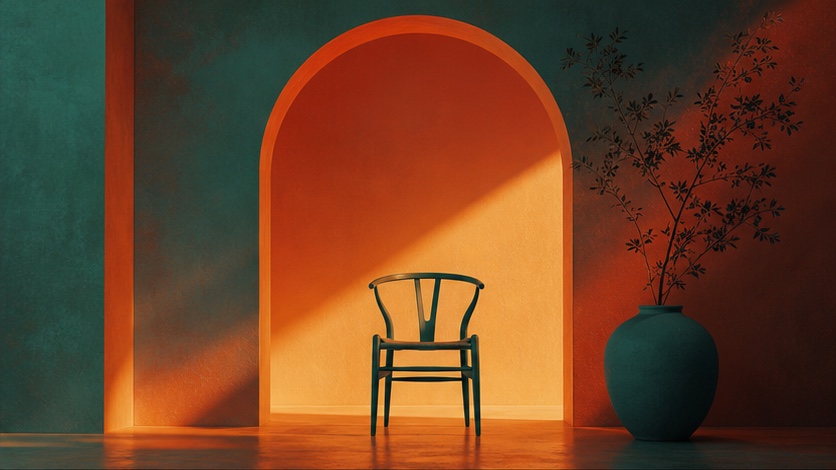
Style retention across portraits, products and scenes
The core of this test is to observe how consistently the chosen style reference is applied across different subjects. This section outlines what to look for when evaluating your generated images.
Portraits
When reviewing portraits, pay attention to:
- Skin tones and highlights: Does the
--srefinfluence the warmth, coolness, or luminosity of the skin? - Hair texture and rendering: Are there specific brushstroke qualities, softness, or sharpness that carry over?
- Facial features: While
--srefshouldn't transfer specific features, it might influence the overall rendering style (e.g., painterly, photographic, illustrative). - Background blur/detail: Does the style reference dictate a shallow depth of field or a highly detailed background?
Products
For product shots, consistency in style is often critical for branding. Look for:
- Material rendering: How are reflections, refractions, and surface textures (e.g., metallic, matte, glossy) influenced by the
--sref? - Product lighting: Does the style reference impose a specific type of lighting (e.g., dramatic, softbox, natural window light)?
- Shadow quality: Are shadows hard or soft, long or short, and do they match the reference's aesthetic?
- Background integration: How does the product sit within its environment, and does the background style align with the reference?
Scenes
Scenes offer the broadest canvas for style application. Observe:
- Overall color grading: Does the
--srefconsistently apply a specific color filter, saturation, or hue shift across different scenes? - Atmospheric effects: Is there a consistent presence of fog, haze, lens flares, or other atmospheric elements?
- Environmental textures: How are natural elements like foliage, water, or stone rendered in terms of detail and stylization?
- Depth and perspective: Does the style reference influence the sense of depth or the overall perspective of the scene?
By systematically comparing the SREF-applied images against each other and against the non-SREF baseline for each subject and seed, you can gain a clear understanding of V8.2's ability to maintain a consistent style. Look for patterns in how the style elements are retained or lost across the different content types.
Personalization on vs off
Midjourney V8.2 includes a --personalize parameter [S2], which allows the model to adapt its output based on your past preferences and generated images. This can influence the "default" aesthetic of your generations. When testing --sref, it's important to understand how --personalize might interact with it.
How Personalization Works
When --personalize is active, Midjourney might subtly adjust elements like color choices, composition, or even the interpretation of certain keywords to align with styles you've previously favored. This can be beneficial for individual users seeking a more tailored experience.
Impact on --sref Testing
For a controlled test of --sref consistency, the --personalize parameter introduces an additional variable. If your goal is to evaluate the raw, unbiased application of a style reference, it's advisable to test with --personalize turned off. This ensures that any observed style retention or deviation is primarily attributable to the --sref image and the prompt, rather than your personal generation history.
However, if you are testing --sref for a personal workflow where you do use personalization, then testing with it enabled would be more representative of your actual use case.
Testing with and without Personalization
To incorporate this into your test, you can add an additional set of generations for each subject and seed, explicitly using --personalize 0 (off) and --personalize 1 (on, or simply omitting the parameter if it's your default).
Example Prompt with Personalization Off:
/imagine prompt: a contemplative woman, soft studio lighting, muted color palette --sref https://example.com/my-unique-style.jpg --sw 100 --seed 123 --ar 16:9 --personalize 0
Example Prompt with Personalization On (or default):
/imagine prompt: a contemplative woman, soft studio lighting, muted color palette --sref https://example.com/my-unique-style.jpg --sw 100 --seed 123 --ar 16:9 --personalize 1
(Note: --personalize 1 is often the default behavior if you have personalization enabled in your settings, so simply omitting the parameter might achieve the same result.)
By comparing the --sref results with and without --personalize, you can determine if your personal aesthetic biases are significantly altering the intended style from the reference image. This helps in understanding the true influence of --sref in different operational contexts.
Failure modes and prompt corrections
Even with a robust --sref system like Midjourney V8.2, you might encounter situations where the style isn't applied as expected. Identifying these "failure modes" and knowing how to correct them is crucial for achieving consistent results.
Common Failure Modes
- Weak Style Application: The generated image only vaguely resembles the
--srefaesthetic, or the text prompt dominates the style. - Overpowering Style: The
--srefis too strong, leading to images that lose the subject's details or become too abstract. - Inconsistent Elements: Some stylistic elements are retained (e.g., color palette) but others are lost (e.g., texture, lighting).
- Subject Distortion: The style reference inadvertently distorts the subject, making it unrecognizable or odd.
- Conflicting Styles: The text prompt describes a style that clashes with the
--srefimage, leading to a muddled output.
Prompt Corrections and Strategies
Here's a table outlining common issues and corresponding prompt adjustments:
| Failure Mode | Observation | Correction Strategy
Open the matching PixMind model route and run one real brief with the checklist above.